eTrapp Resource Guide
Meet eTrapp
Pan overflow and flooding due to backed-up HVAC condensate is a harsh reality in both residential housing and commercial buildings. The majority of all non-rising water damage insurance claims are due to A/C flooding which usually occurs due to clogged condensate output lines. Historically, the solution has been for HVAC techs to manually clean out the line or for the home or building owner to apply caustic chemicals or vinegar to the line or pan if they have been educated to do so and are physically capable of it. Clogged condensate lines result in a system shut down if the system has a working float switch. If not, the emergency pan overflows, causing water damage to floors, walls, and ceilings.
eTrapp is the solution to this costly problem.
eTrapp Condensate Treatment System is a technologically-advanced device that keeps HVAC condensate lines clear and proactively reports issues before problems occur.
Using state-of-the-art condensate treatment, flow sensing, and system monitoring, eTrapp provides continuous treatment to condensate output and provides performance feedback via a wireless connection. eTrapp has numerous features and benefits that will revolutionize condensate treatment and service calls.

Table of Contents
How eTrapp Works
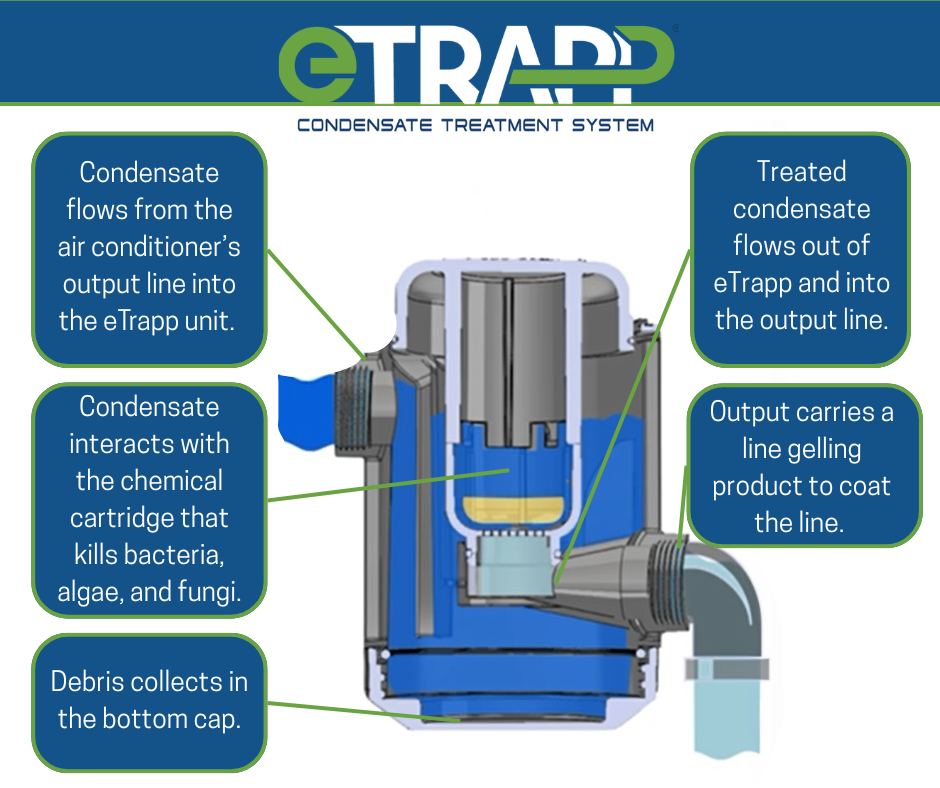
Unlike any other product on the market, eTrapp uses a proprietary chemical treatment to eliminate the problem of clogged condensate lines by constantly treating the condensate water, inhibiting bacterial growth. This unique treatment system is a key aspect of how eTrapp works to maintain clear condensate lines.
eTrapp’s patented system works like a water treatment plant that is plumbed directly into the air-conditioner’s condensate output line. Condensate flows through the eTrapp unit and is constantly treated via the cartridge that contains an eco-friendly proprietary compound. The compound is non-corrosive on plumbing, and it includes gelling technology so that debris can’t attach to the walls of the output pipe.
The IoT Hub
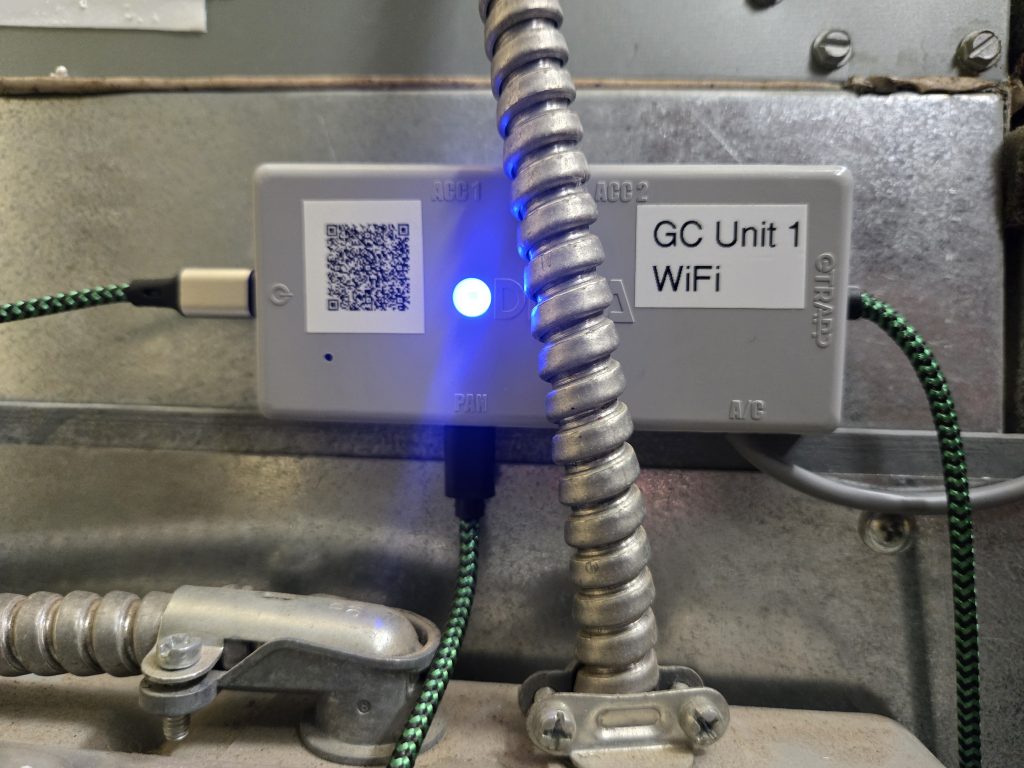
eTrapp is a smart device. The unit features a sensory array monitored by an IoT Hub that feeds real-time information to the eTrapp App (for end users) and the Pro App and Pro Portal (for the HVAC tech) via a local Wi-Fi or LoRaWAN connection. The IoT Hub is to be mounted to a flat surface on the air handler. The IoT Hub plugs into a power source, and it provides power to the eTrapp unit and water sensor.
The sensory capabilities of eTrapp can predict potential problems before they occur and send alerts to the unit owner and HVAC tech.
For instance, if the condensate level within the eTrapp unit is more than 95% full, eTrapp sends notifications to the unit owner via the eTrapp App and email. The Pan Flood Sensor included in the installation kit will shut off the system entirely if water reaches a certain level in the secondary pan.
Additionally, if the fluid level in the eTrapp falls below 20% because the air-conditioning system is producing less condensate than needed to maintain a water barrier against sewer gas backflow, an alert is sent to the unit owner and the Pro indicating that the system should be run to replenish condensate to a safe level.
Maintaining eTrapp is easy. One cartridge lasts for about 180 days. As the cartridge life nears its end, notifications are sent to unit owners and Pros to set up a service call to replace it.
eTrapp App
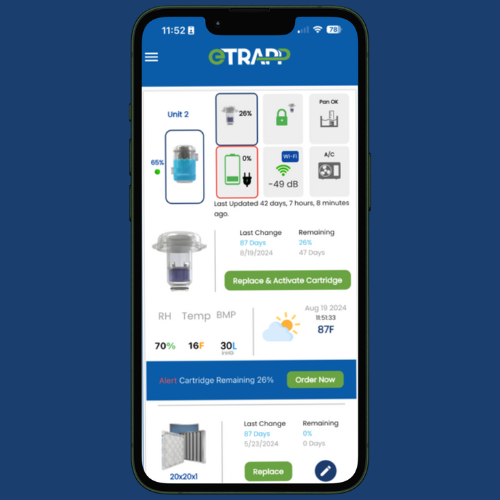
A unit owner will have access to the eTrapp App. The app is available free of charge in the Google Play Store and Apple App Store.
The eTrapp App provides the following data:
- Condensate level
- The app will send a notification if the water level falls below 20%; the homeowner should then run their air conditioner for a few minutes in order to replenish the water supply in the eTrapp since this acts as a water barrier against the possible introduction of sewer gas into the home or office.
- The app will send a notification if the water level falls below 20%; the homeowner should then run their air conditioner for a few minutes in order to replenish the water supply in the eTrapp since this acts as a water barrier against the possible introduction of sewer gas into the home or office.
- A/C Shut Down
- Pan Flood Sensor was triggered to shut off the air conditioner because it sensed water in the emergency pan.
- Cartridge life
- An initial notification is sent when 45 days are remaining. A reminder is sent every 15 days until the unit is serviced.
- Power is connected and functioning properly
- Wi-Fi or LoRa signal strength
- Air filter life
- Provides helpful reminders after each user-defined cycle.
- Data on climate conditions. This data includes ambient temperature, barometric pressure, and relative humidity that contribute to the formation of algae and fungi
- Air-Conditioning unit running time
- This can be valuable cost-saving information for homeowners without smart thermostats.
Pro App and Pro Portal
eTrapp exclusively sells through professional HVAC distribution outlets to professional HVAC installation and repair companies. An HVAC company senior management team will have access to the Pro Portal which is a fully-functional backend management system for all of the eTrapp’s that the company has installed. The Pro Portal’s design incorporates the technology of eTrapp in a way that makes management tasks more efficient.
Every eTrapp that a Pro installs will send data to the Pro Portal, allowing a Pro to see real-time information on all client units via an easy-to-read dashboard reporting system. All of the information that a homeowner receives through the eTrapp App is also available to the Pro. This redundancy ensures that nothing is overlooked.
Any eTrapp that is in alert status or is due for a cartridge replacement prominently displays in the eTrapp Alerts and Cartridge Alerts segments of the portal. The geo-location and customer information is quickly accessed which allows a Pro to contact the client. The Pro Portal functions as a CRM (Customer Relationship Management) tool enabling the company to register their clients and technicians to easily assign work orders proactively.

Before installing your first eTrapp, you are required to make a Pro Portal profile.
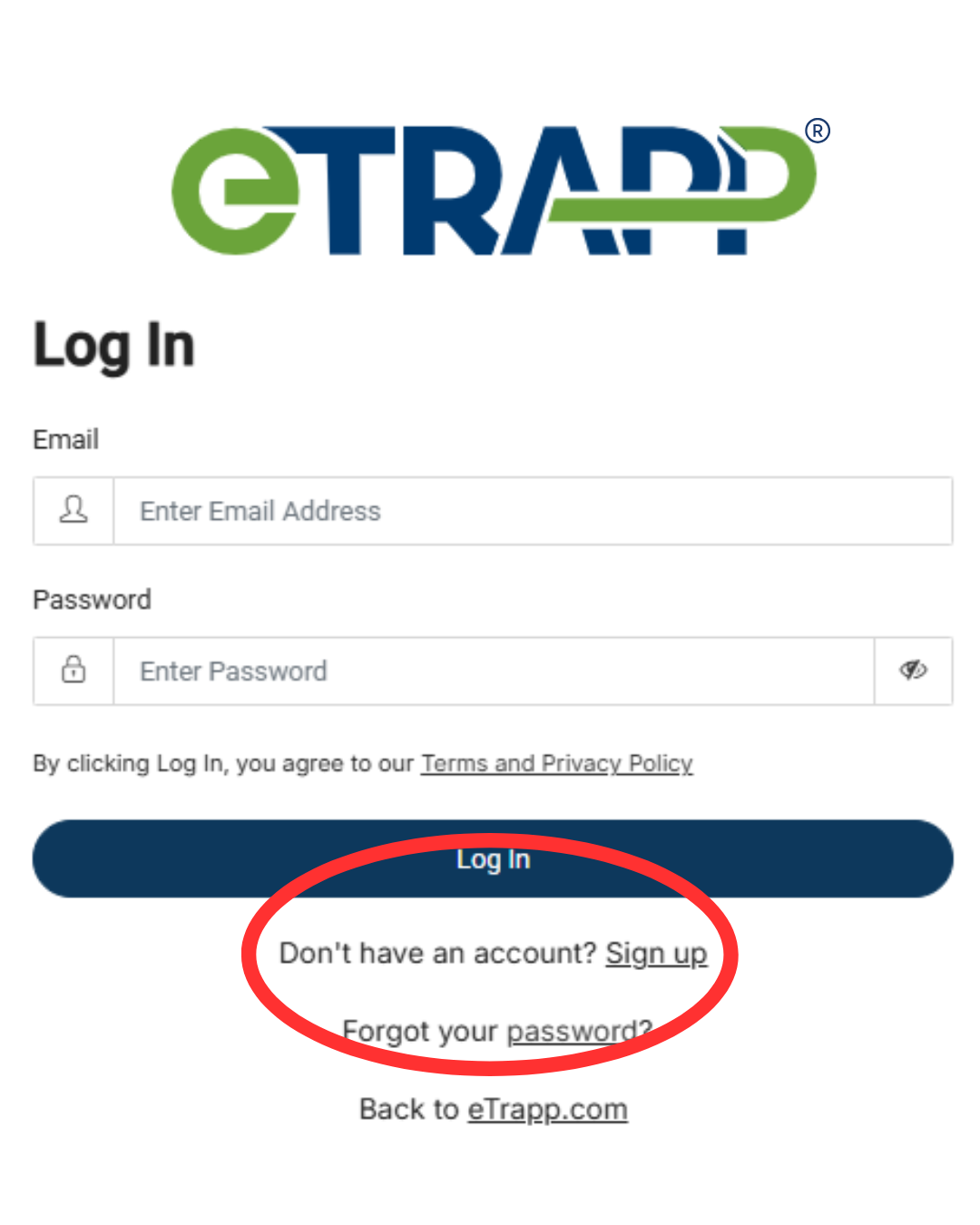
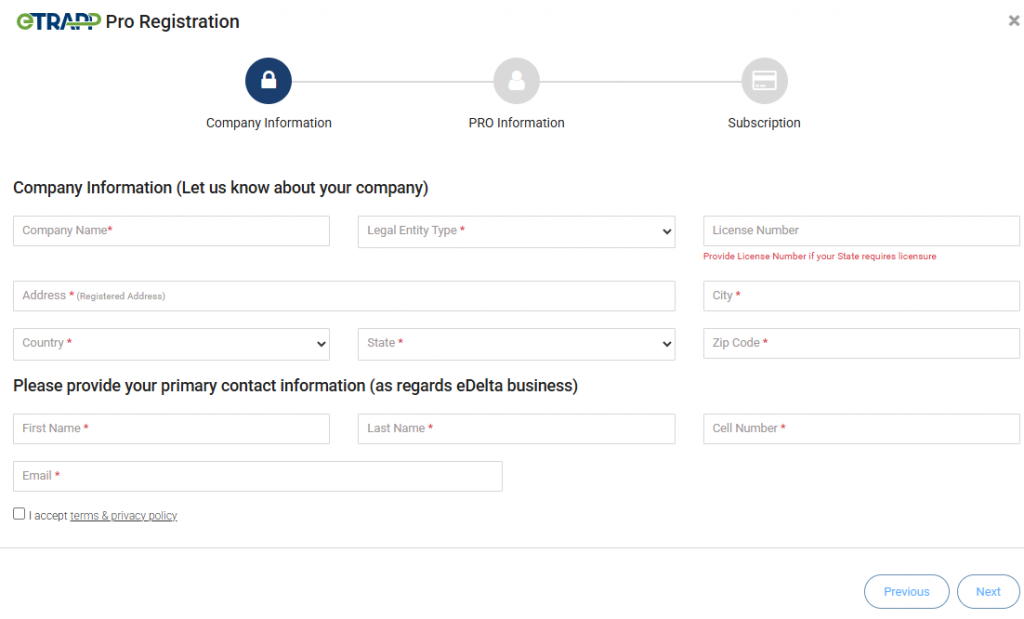
Navigate to the Pro Portal log in page which you can access at this link or by going to the Login page at the top right of the header menu on etrapp.com and selecting Pro Portal. If you don’t have an account yet, navigate to “Don’t have an account? Sign up” below the log in area. Input your information, and you will receive an email with a temporary password. Return to the login page and log in using your email and temporary password. You will be prompted to create a password and log in again.
Once in the Pro Portal, you will acknowledge the Installation Instructions before seeing your dashboard.
Registering Technicians
The tech will download the eTrapp Pro app available in the Apple App Store and Google Play Store free of charge. The tech will log in with the credentials in the email to gain access to the app’s dashboard.
How to Install eTrapp
The eTrapp Condensate Treatment System will be installed by HVAC technicians that we refer to as Pros. It is plumbed into the condensate drain line output and should be installed as close as possible to the air handler. A Pro needs to ensure that eTrapp can be installed on an HVAC unit beforehand; some HVAC units may not be able to support eTrapp as the unit generally requires 5 to 6 inches of clearance for proper installation.
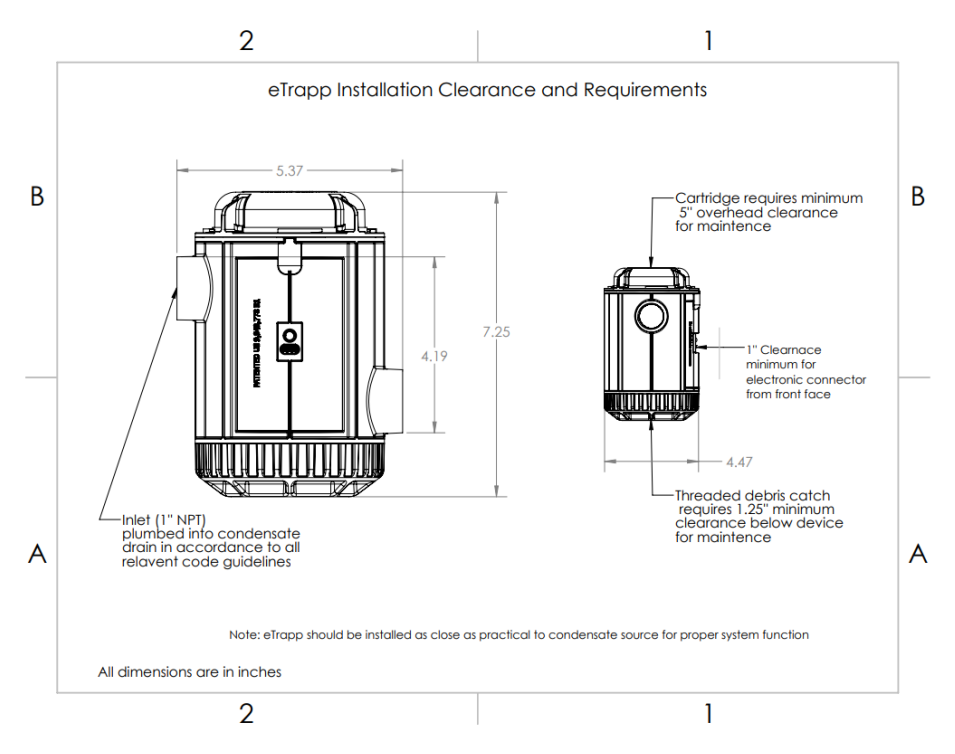
The installation breaks down into three categories: plumbing, wiring, and configuration.
Pre-Installation
- Clean the evaporator coil and pan.
- Make sure that the condensate drain has a 4-6% fall. That is, ensure that the unit is mounted level and the condensate lines downstream have sufficient fall to allow water to flow.
- Ensure that the condensate drain line is clear and free of debris.
- Make sure the HVAC air handler is using best practices.
- Locate a usable 110v outlet within 5 feet of the installation. Most standard codes require a power source within five feet of the air-conditioning unit.
- Wi-Fi or LoRa signal is required in the vicinity of the air handler. Obviously, Wi-Fi password is required.
Plumbing Installation Instructions
*You can watch the plumbing installation process here: How to Install eTrapp Condensate Treatment System
Plumbing Installation Supplies
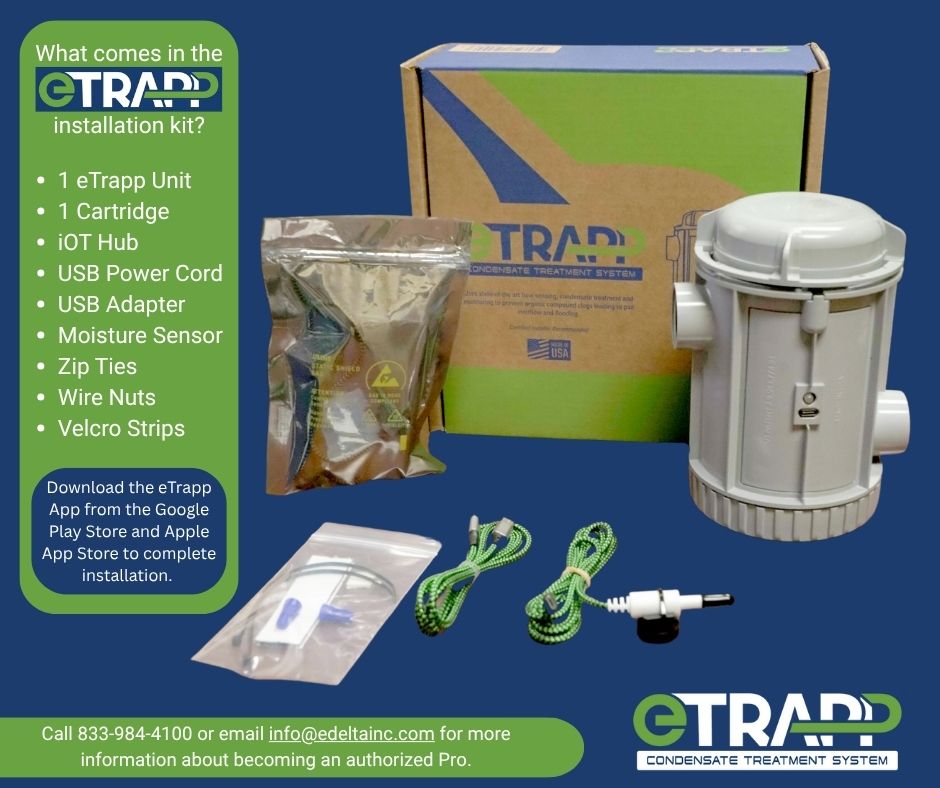
eTrapp sells exclusively through HVAC distribution outlets nationwide. It arrives in a pre-assembled package that includes the following:
- 1 eTrapp Unit
- 1 Cartridge
- IoT Hub
- USB Power Cord
- USB Adapter
- Pan Flood Sensor
- Zip Ties
- Wire Nuts
- Velcro Strips
Other supplies required to complete the installation include:
- 3 1-inch male-to-¾-inch female PVC fittings
- ¾ inch PVC pipe
- ¾ inch coupling
- Teflon Tape
- PVC cutter
- PVC Glue or pipe dope
- PVC primer
- Sandpaper
- Level
The eTrapp inlet and outlet have standard 1-inch female npt threads, and most residential units will utilize ¾’’ fittings. If the installation is being performed on existing construction, disconnect the plumbing. For residential applications a 1’’x3/4’’ reducing bushing will need to be fitted.
- Turn off power to the air conditioning unit.
- Install eTrapp as close to the air handler as possible while being able to access the cartridge from the top and the debris clean-out basin on the bottom. Before gluing any fittings, ensure that both the threaded bottom and the twist lock cartridge (top) have enough clearance to be fully removed. Further, the light on the eTrapp should face outwards to be easily viewed when replacing cartridges.
- Screw the fittings into the inlet and outlet of eTrapp. We recommend using Teflon tape to ensure a secure connection. Further, hand tighten the adapter then do a quarter turn by hand. DO NOT OVERTIGHTEN FITTINGS!
- Remove the existing drain pipe from the A/C unit. Then, install the new fitting into the A/C drain.
- Install pipe between the A/C’s fitting and the eTrapp’s inlet fitting. Additionally, rough the surface of the pipe with sandpaper and use primer then apply glue to ensure the best fit.
- Install a ¾ inch coupling on the downstream pipe.
- Repeating the inlet process, install pipe between the outlet fitting and the existing downstream drain pipe.
- Adjust for continuous drain fall; check the fall with a level and adjust the downstream pipe accordingly.
- Remove the protective seals from the cartridge as instructed and secure it into the eTrapp.
- Reinstall the insulation around the drain pipe.
- Install a vent between eTrapp and the existing p-trap if you do not remove the existing p-trap so that air pockets don’t form.
Generally, most residential A/C units feature two condensate outlet ports. Often the second port is unused and terminated with a plug. The terminated port sits slightly higher than the primary condensate outlet and only experiences condensate flow when the primary port becomes clogged. Therefore, installers may choose to install a float switch in the secondary port that can run in series with eTrapp’s Pan Flood Sensor for additional flood protection.
Wiring Installation Instructions
The unit owner monitors the system in real time through data provided by the eTrapp App available free of charge at the Apple App Store or the Google Play Store. The eTrapp App provides data on the condensate level, cartridge life, Wi-Fi signal strength, ambient conditions, and more.
Installation Pros receive data from each eTrapp they have installed in their respective territory via the Pro App and Pro Portal. Furthermore, any eTrapp that is in alert status or may be due for a cartridge replacement prominently displays in the eTrapp Alerts segment of the portal. A Pro uses this data to proactively contact the homeowner to schedule a service call.
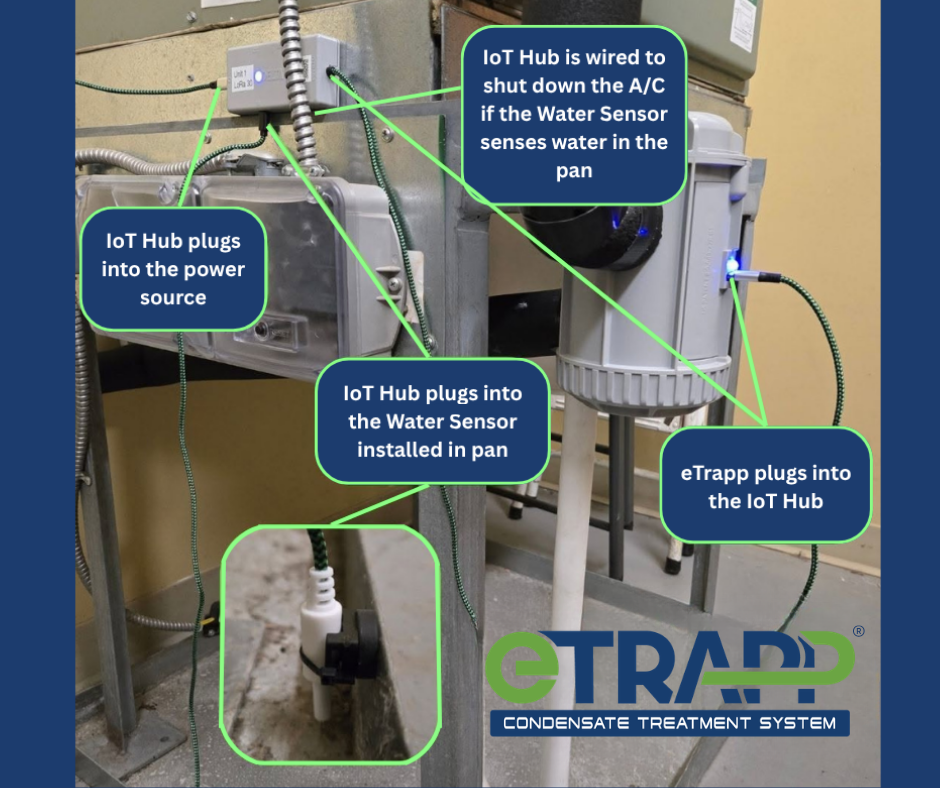
- Find a proper mounting location for the IoT Hub. Choose a smooth surface within reach of all of the attached cables and mount the IoT Hub using the provided adhesive-backed Velcro. The indicator light and text should face outward. While many installers mount directly to the side of the A/C unit, signal strength will be improved if a non-metallic mounting surface is available.
- Locate the nearest 110v outlet. Most standard codes require a power source within five feet of the air-conditioning unit. The USB-C power cable should be connected to the IoT Hub’s port marked with the power symbol. Next, connect the cable marked eTrapp to the female USB-C port below the indicator light on eTrapp. At this time, both the indicator light on eTrapp and the IoT Hub should be illuminated.
- Install the provided Pan Flood Sensor. The Pan Flood Sensor is shipped already installed on a magnetic mounting bracket. If your overflow pan is made from a non-ferrous material, you will need to remove the magnet and replace with the double-sided adhesive tape included in the small parts bag. Install the water sensor onto the side of the condensate overflow pan. The sensor’s longer leg should be about 1/4 inch from the floor of the pan. The Pan Flood Sensor plugs into the IoT Hub port marked Pan.
A/C Shutoff Wiring
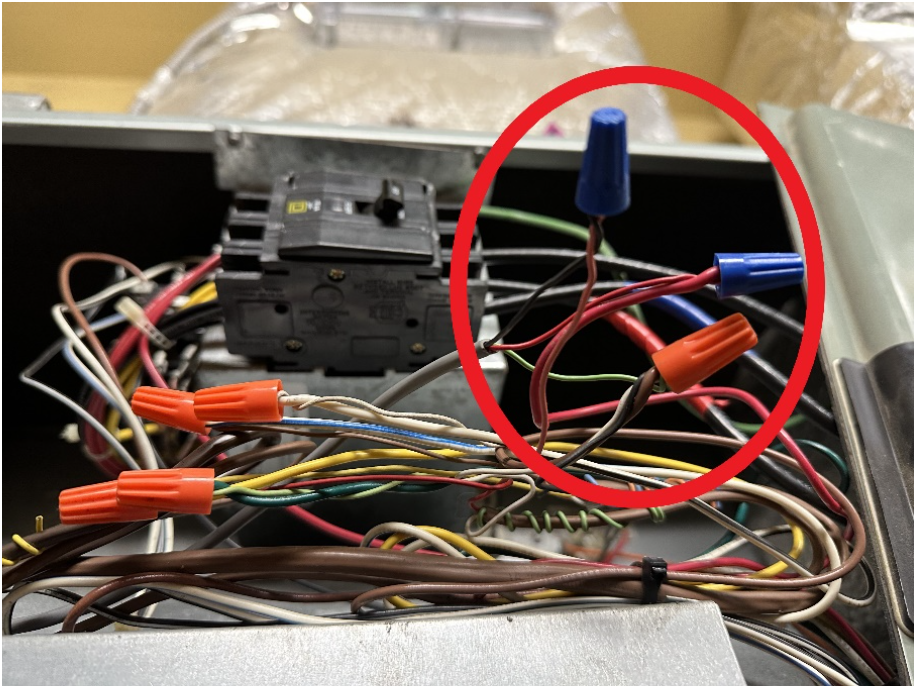
When the grey A/C cut-off cable is installed, eTrapp can shut down the A/C unit to prevent property damage when a flood condition is detected by the Pan Flood Sensor. This feature is optional, but highly recommended. If you choose not to utilize this feature, simply use a provided cable tie to bundle and secure the A/C cut-off cable.
To install this feature, first shut down power to the A/C unit and locate where the thermostat wires tie into the air handler. Remove the wire nut or electrical connector attaching the 24V power supply from the A/C to the thermostat power (red). Connect the red cable from the A/C cutoff lead to the power supply wire and the black lead to the thermostat power wire. This will connect eTrapp’s IoT Hub in series with the thermostat. Additional wire connectors are provided in the small parts kit. Finally, connect the green wire to the thermostat common (white).
How To Connect eTrapp To The Internet
You can watch How to Provision eTrapp App here: How to Provision the eTrapp App
- Log into the eTrapp Pro App using the credentials created in the Pro Portal
- Click on the ‘Provision New eTrapp” tab and click Create New Customer. Follow the prompts to enter customer information (this will send the customer a link to download their eTrapp App)
- Scan the QR codes on the eTrapp and the cartridge
- Connect the eTrapp to the local Wi-Fi or LoRa
- The blue LED on the IoT Hub unit will flash four times (repeatedly) when successfully connected to a Wi-Fi network. When successfully connected to a LoRa network, the blue LED will flash five times (repeatedly). Once eTrapp successfully connects to Wi-Fi or LoRa, data will begin being transmitted to the apps and Pro Portal.
eTrapp Cartridge Replacement
You can watch How to Replace eTrapp Cartridge here: How to Change the eTrapp Cartridge
eTrapp cartridges are designed to last for 180 days (6 months). Notifications to schedule a service to replace the cartridge will be sent through the eTrapp App and Pro Portal at 45 days remaining, 30 days remaining, 15 days remaining, and 7 days remaining. Replacing the cartridge takes just a few minutes.
The Pro will arrive at the client’s home or office with a new cartridge.
- Remove shrinkwrap and plastic seal from the new cartridge.
- Open eTrapp Pro App, click on cartridge or click on “Replace Cartridge.”
- Following the prompts in the app, scan the QR code on the new cartridge.
- Click “Submit”
- Unscrew and remove the old cartridge and replace it with the new cartridge.
- Screw in the new cartridge until the red light turns blue.
- The app will show 100% life for the new cartridge.
Alerts and Notifications
eTrapp’s IoT Hub and sensor array will send the following alerts to the eTrapp App, Pro App, and Pro Portal.
Low Water Level – If the water level inside of the unit is less than 20% full, a notification will be sent to the eTrapp App and Pro Portal. This alert reminds the unit owner to run the air-conditioning system to replenish the condensate level to above 20% full. Keeping the condensate above this level maintains a water barrier for sewer gas that could otherwise be pulled back through the system from the sewer line that the condensate line is plumbed into when the air conditioner begins to run.
Cartridge Life – At intervals of 60 days, 45 days, 30 days, 15 days, 7 days, and 0 days until a cartridge requires replacement, notifications will be sent to the eTrapp App and Pro Portal. Our proprietary cartridges are designed to last for about 180 days though this depends on the amount of usage. The Pro Portal allows the technician company to proactively schedule a cartridge replacement service ahead of time so that the cartridge can be replaced on schedule for uninterrupted service. A unit owner can contact their technician through the eTrapp App to schedule maintenance as well if the Pro has not contacted them first.
Air Filter Life – The eTrapp App keeps track of the life span of the air filters the unit owner installs. Air filters are crucial to the operation of an HVAC system. Regularly changing filters ensures less dust and debris will be able to enter the system. The eTrapp App will send notifications when the air filters are ready to be replaced according to the user’s defined life span.
A list of alerts that eTrapp can send as notifications are listed below.
| Water Level | Between 0% and 20% * | Condensate level is below normal, run A/C unit to refill. | Every three days until resolved. |
| Pan Flood | Flooded | Condensate detected in overflow pan, shut down the A/C unit and contact your Pro. | Daily until resolved. |
| Battery Level | 15% or below | Battery below 25% life, contact your Pro for a replacement. | Every 7 days until resolved. |
| Wi-Fi Signal | 20% or below | WiFi signal strength weak, reposition router to improve. | Every 7 days until resolved. |
| A/C Cutoff | Relay ON | A/C cut off activated, contact your Pro. | Daily until resolved. |
| Device Offline | When it goes offline | Device: [Device_Name] just went offline. | Always |
| Cartridge | Lock open | Cartridge not locked. Twist lid clockwise to lock. | Daily until resolved. |
| Cartridge | Life 45 days – 1st Notice | Cartridge change due in 45 days. | One time. |
| Cartridge | Life 30 days – 2nd Notice | Cartridge change due in 30 days. | One time. |
| Cartridge | Life 15 days – 3rd Notice | Cartridge change due in 15 days. | One time. |
| Cartridge | Life 10 days – 4th Notice | Cartridge change due in 10 days. | One time. |
| Cartridge | Life 5 days – 5th Notice | Cartridge change due in 5 days. | One time. |
| Cartridge | Life 0 day (EOL) – 6th Notice | Cartridge has expired, eDelta is not responsible for any flooding or damage resulting from condensate overflow. | One time, then again in 10 days. |
Acquiring eTrapp
eTrapp Condensate Treatment System is proudly made in America. eDelta, Inc. is headquartered in Mandeville, Louisiana, and our manufacturing plant is located in Louisiana. Our process for creating units is completely automated. One eTrapp unit is produced in 38 seconds, and two cartridges can be produced in 25 seconds. We are prepared to scale.
eDelta requires a distributor to make purchases in case quantities. One Master Case is 8 installation units. A unit is considered an Installation Kit which includes:
- 1 eTrapp Unit
- 1 Cartridge
- IoT Hub
- USB Power Cord
- USB Adapter
- Moisture Sensor
- Zip Tie
- Wire Nuts
- Velcro Strips
One Master Case of Cartridges is 48 replacement units.